Product review for the mTrading team

Onboarding and product review

Sergey Korsikov16 November 2026Draft

One new client account, taken from sign-up to deposit on the website and in the iPhone app, then compared with the brokers that lead in Asia.

01

Summary

mTrading has the parts of a strong Asian broker, but careless execution loses clients and deposits at the steps that make money: the bonus, the first deposit and the first withdrawal.

55issues logged
9high priority
5fixes that matter most
0withdrawals possible in the test

What works

  • KYC passes in minutes (Sumsub), and the client area opens before KYC
  • Demo account opens instantly with 10,000 USD, on web and in the app
  • Partner cabinet is detailed: 9 report types, PDF and CSV export, sub-partners, rebates, QR referral link
  • Copy trading has real risk controls: order size modes, ratio, daily profit and loss limits
  • Live chat answers within minutes; the app shows deposit limits per payment method

What breaks

  • The deposit bonus, the brand's main promise, is revealed only through errors after the client picks it
  • Deposit needs KYC, but the client finds out only after choosing an amount
  • Withdrawal needs 2FA, 2FA needs a verified phone, and the SMS never arrived: withdrawal stayed locked on web and in the app
  • Raw errors (promotion_id:, permission_denied), conflicting minimums and half-done translations
  • In the app, cashback and the in-app PIN did not work

Most of the top 5 fixes are front-end work and copy, not new systems. The bonus fix alone turns a demotivating error into a lever for bigger deposits.

02

What was tested

One new client, start to finish: sign-up, KYC, client area, deposit up to the payment step, partner cabinet, copy trading, loyalty and settings. Desktop Chrome on macOS on 14 November (2 screen recordings, 17 minutes), then the iPhone app on 16 November (10 minutes), plus desk research on the public site, store listings, reviews and 8 competitors.

03

Top 5 issues

All five sit on the path from sign-up to the first deposit and the first withdrawal, where revenue is won or lost.

1

The bonus is refused after the client picks it

Deposit form · web and app

What happens

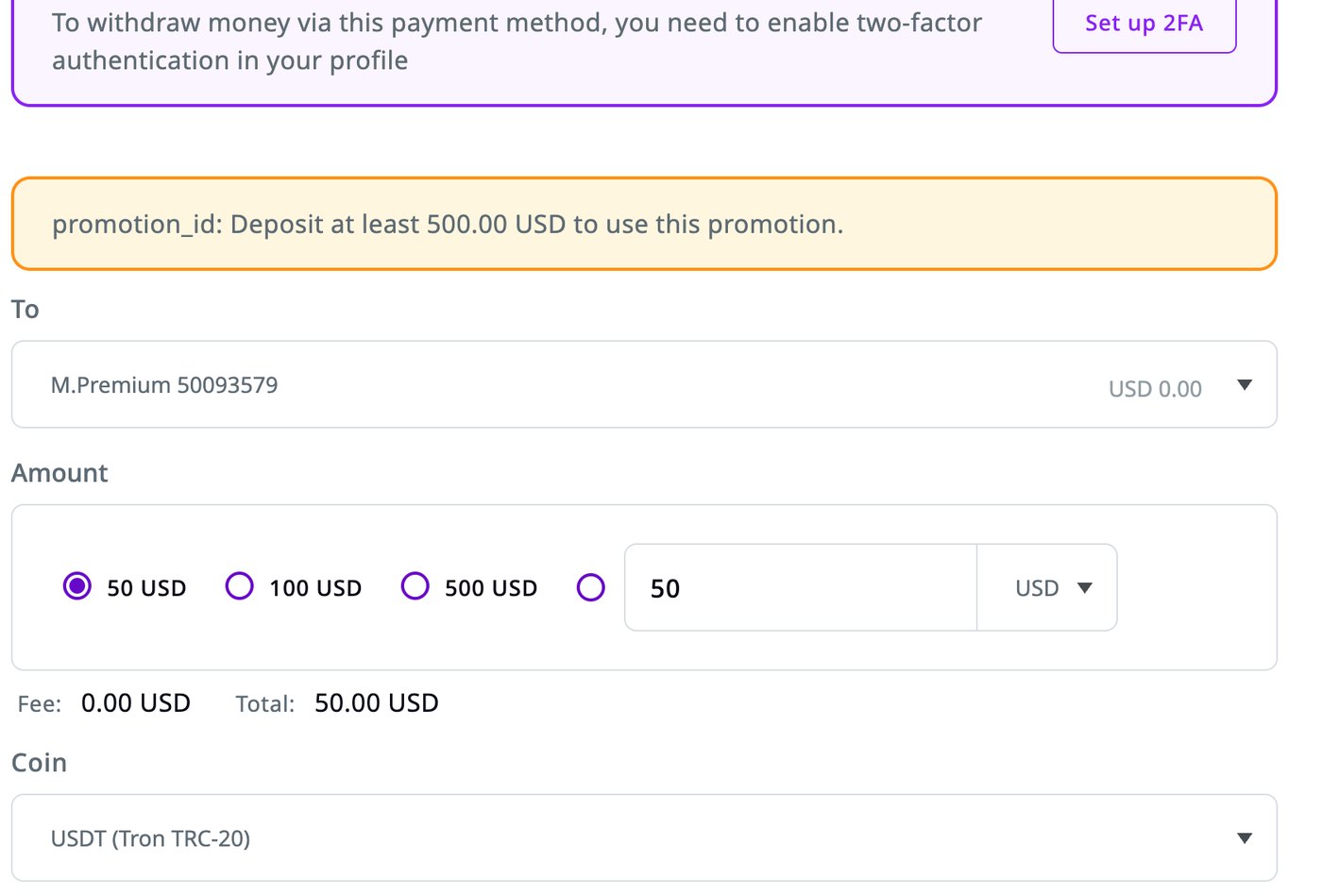
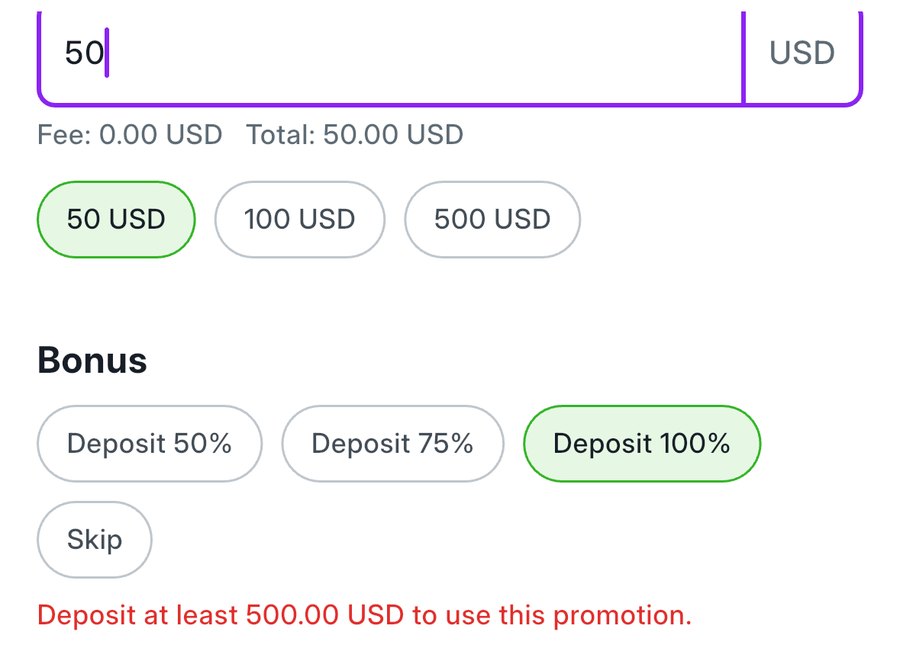
The deposit form offers Deposit 100%, 75%, 50% and Skip, with no amounts. With 50 USD and 100% selected, the web form even says "You will receive 50.00 USD". On submit: promotion_id: Deposit at least 500.00 USD to use this promotion. The tiers (50% from 100 USD, 75% from 250, 100% from 500) appear only as errors. Skip is pre-selected, and the destination defaults to the Wallet, where no bonus applies. The app drops the promotion_id: prefix, but still shows the rule only after the choice.

Web deposit form with 100% bonus selected for 50 USD and the error promotion_id: Deposit at least 500.00 USD
Web: the error carries a raw field name.
App deposit form with Deposit 100% selected for 50 USD and the error Deposit at least 500.00 USD
App: cleaner text, same surprise.
Fix
  1. Put the threshold on each option: "100% · from 500 USD", "75% · from 250 USD", "50% · from 100 USD".
  2. Recalculate as the amount changes: options out of reach turn grey, the best reachable one is highlighted.
  3. Add a live nudge under the amount: "Add 450 USD to get a 100% bonus (+500 USD)".
  4. Show "You will receive" only when the bonus will actually apply.
  5. When a bonus is chosen, switch the destination to an eligible account (M.Premium) and say so.
  6. Use one bonus message across the site, the app, the client area and the store listings (today there are at least five versions).

Why it matters. The bonus is the brand promise. Today it punishes the client who tries it. Shown upfront, it becomes a lever for deposit size, like "add 5 EUR for free delivery" in food apps.

2

Deposit needs KYC, but the client learns it at the last step

Dashboard and deposit page · web and app

What happens

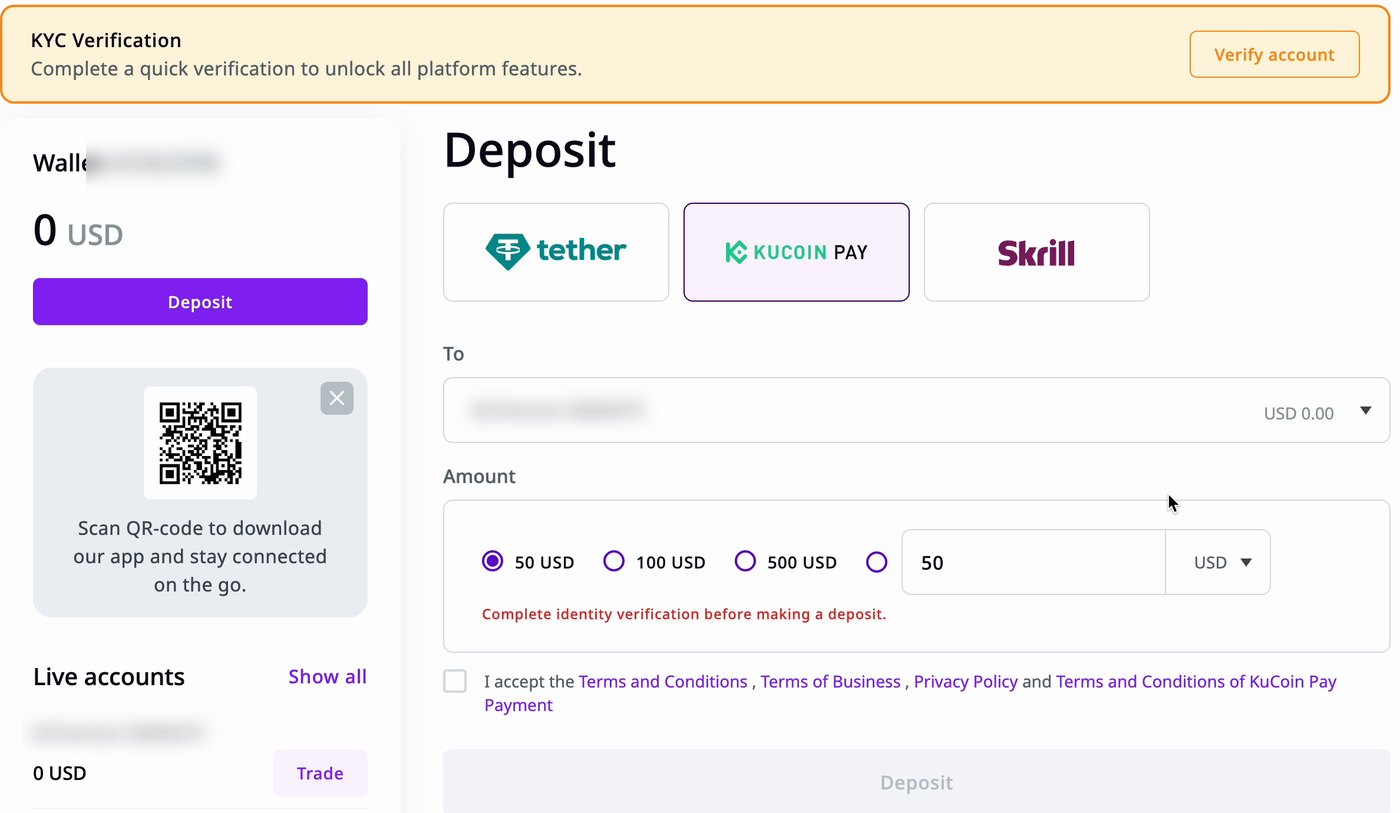
The dashboard banner says KYC will "unlock all platform features", and Deposit buttons are on every screen. Only after the client picks a method and an amount does the form say "Complete identity verification before making a deposit." The Deposit button stays grey.

Web deposit page: KYC banner at the top, method and amount chosen, small red text Complete identity verification before making a deposit
The rule appears in small red text under the amount.
Fix
  1. Change the banner to "Verify your identity to deposit. It takes about 5 minutes." with one button.
  2. On the Deposit page, before the methods, show the KYC status and a "Verify now" button; keep the form locked until then.
  3. Do the same in the app.
  4. Consider testing a capped deposit before KYC, with verification required before any withdrawal.

Why it matters. KYC passes in minutes, so this is only a matter of telling the client earlier. The first deposit is the conversion that pays the IB.

3

Withdrawal is locked behind an SMS that never arrives

2FA and phone verification · web, app and live chat

What happens

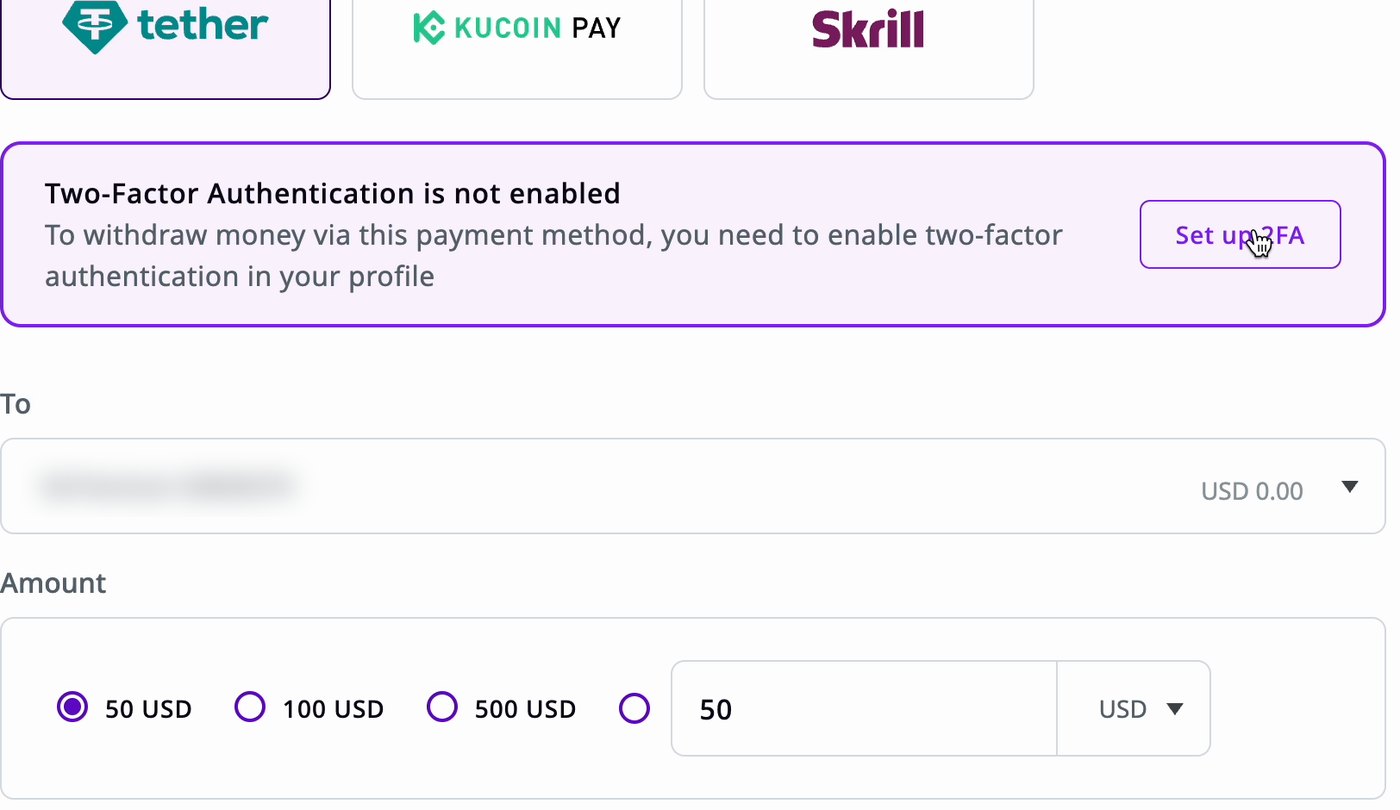
Withdrawal needs 2FA, 2FA needs a verified phone, and the phone is not verified at sign-up. In both tests the SMS never arrived: on the web after 3 attempts, with the resend timer growing to 4.5 minutes; in the app after a 59-second and then a 299-second wait. Live chat answered fast and offered to send the code in the chat. That code was rejected, and verification locked for 24 hours. No other channel is offered.

Web deposit page with the notice Two-Factor Authentication is not enabled, you need to enable it to withdraw
Web: 2FA is required to withdraw.
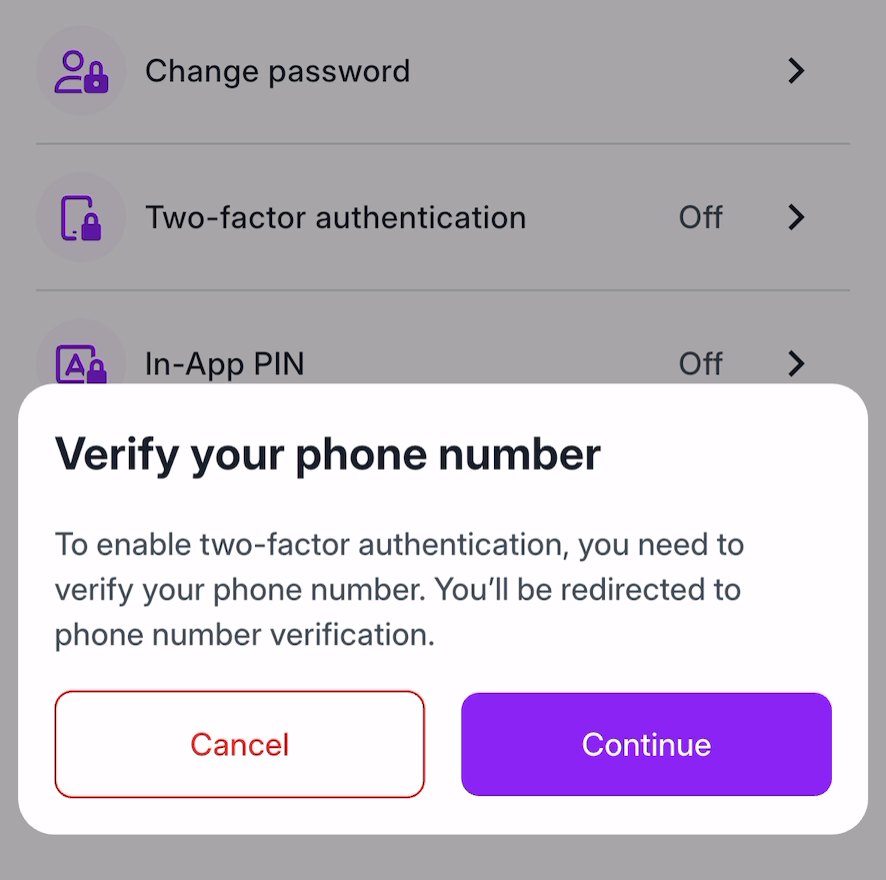
App settings with the modal Verify your phone number to enable two-factor authentication
App: 2FA sends the client back to the SMS.
Fix
  1. Verify the phone at sign-up or at the first deposit, while the client is motivated, not at the first withdrawal.
  2. Offer an authenticator app as the main 2FA method, independent of SMS; email or WhatsApp codes as a fallback.
  3. After the last attempt, say what happens next and when, with a link to support.
  4. Give support a written manual procedure with identity checks. A code read into the chat can confirm a phone the client does not own.
  5. Track SMS delivery by country and provider, and switch providers where it fails.

Why it matters. "Can't withdraw" and "2FA blocks withdrawal" are recurring complaints on Trustpilot and WikiFX. One blocked withdrawal costs the client and the IB's next referral.

4

Raw errors and limits that contradict each other

Deposit, copy trading, sign-up · web and app

What happens

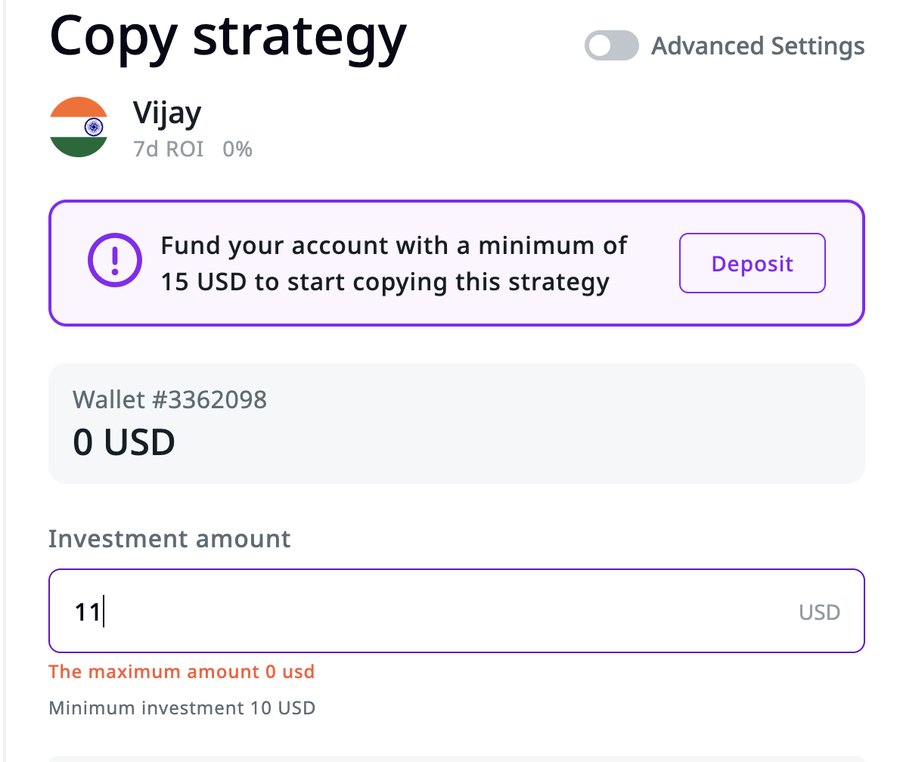
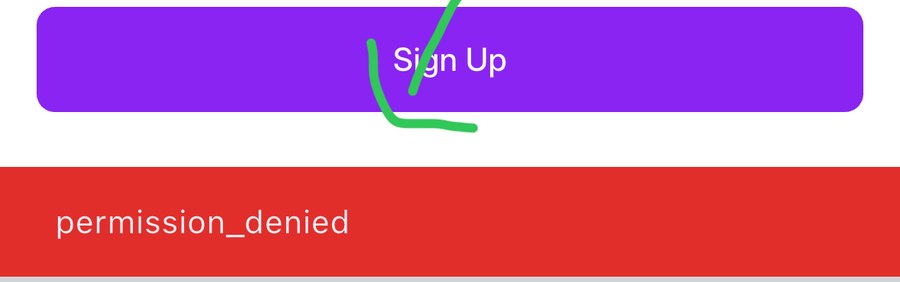
Clients see system codes: promotion_id:, "The maximum amount 0 usd", "unknown error", and in the app sign-up a bare permission_denied. Minimums disagree: the deposit field says "Any amount" on the web and "From 0.01" in the app, while the minimum is 50 USD and the site advertises accounts "from $10". The copy trading form shows 15 USD, 10 USD and 0 USD as limits at once.

Copy trading form: banner minimum 15 USD, Minimum investment 10 USD, error The maximum amount 0 usd
Copy trading: three limits on one form.
App sign-up: Sign Up button with a red bar saying permission_denied
App sign-up with a new email address.
Fix
  1. Go through every client-facing error once: each one says what went wrong and what to do next, in the client's language.
  2. Keep each limit in one place and show it before input: placeholder "Min 50 USD", the same figure on the site.
  3. Copy trading: one minimum, and "Your balance is 0 USD. Deposit at least 15 USD to copy this strategy."
  4. Add a release check: no raw codes and no snake_case text on client screens.

Why it matters. Every confusing error is a lost client or a support ticket.

5

The first five minutes

Site, sign-up, first login

What happens

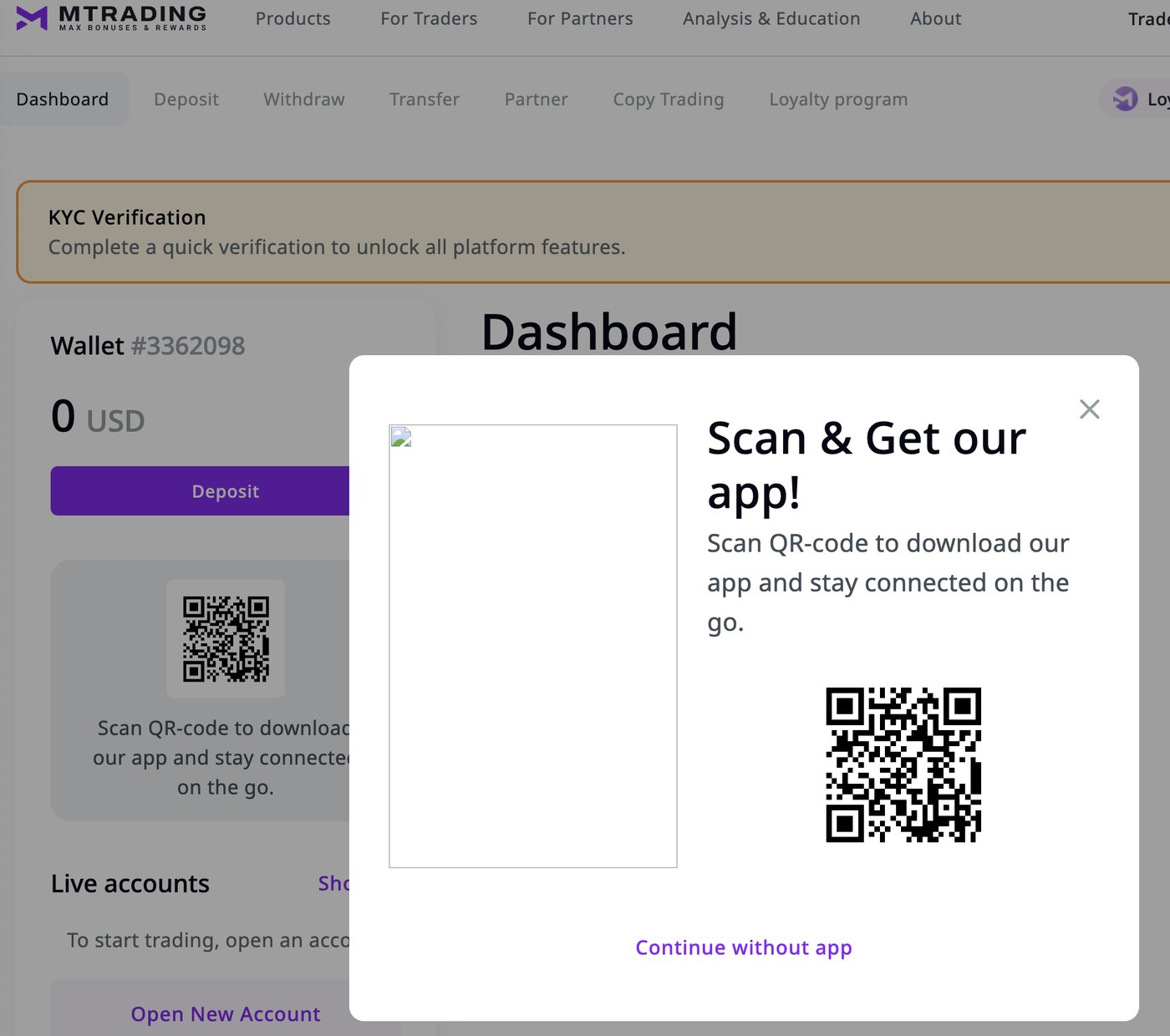
After sign-up a full-screen "get our app" pop-up with a broken image covers the client area: the third app prompt in two minutes. No welcome email arrives, and no trading account is created. Site images are blurry on high-resolution screens, and visitors from blocked regions see a raw "504 Gateway Timeout" instead of an explanation.

First login: app download pop-up with a missing phone image over the dashboard
The first screen after sign-up.
Fix
  1. Fix the pop-up image and keep one app prompt, shown after the first deposit or on mobile.
  2. Send a welcome email within minutes: verify, deposit, bonus tiers, support contacts.
  3. Create a default trading account at sign-up.
  4. Serve sharp images for high-resolution screens.
  5. Show a branded "not available in your region" page with a contact for existing clients.

Why it matters. Trust is set in the first session, and IB clients compare brokers side by side.

04

Web and app review

The full walk-through, in the order a client meets each screen. Open a section to read it.

Web: sign-up, step by step2 screens and an email code; eligibility decided by phone code alone
  1. Reaching the site. Opens from most places. From Estonian mobile data, and once from a Belgian connection, it returned a raw "504 Gateway Timeout". From Russia it does not open, although Russian phone numbers are accepted at sign-up.
    Fix: a branded "not available in your region" page, and one country list for the block and the form.
  2. Email and password. Email is captured first, which is good for follow-up. The password must mix upper case, lower case, digits and symbols.
    Fix: a length rule only and no blocks on password managers, as the current NIST guideline recommends.
  3. Name and phone. The phone code is not pre-filled from the visitor's country: Hong Kong from a Turkish IP, Afghanistan (first in the list) from Japan and Belgium. An unsupported number passes the field and is rejected only on submit: "Region unavailable for registration". The next submit returned "unknown error", most likely because the bot check was spent and not reset. The small print bundles marketing emails into sign-up; unsubscribing needs a message to support.
    Fix: pre-select the code by IP, validate on entry, reset the bot check after a failed submit, a separate marketing opt-in.
  4. Email code. 6 digits, no auto-submit after the last digit, resend allowed after 4 to 5 minutes (30 to 60 seconds is common). The phone is not verified here, which later blocks 2FA and withdrawal.
  5. First login. A full-screen "get our app" pop-up with a broken image. The client area opens before KYC, which is good, but no trading account is created and no welcome email arrives.
  6. KYC (Sumsub). Verified within minutes. The first screen, "All other countries except the one(s) below / United States of America", reads like a question about residence but is a privacy-notice selector. Residence is then shown as the passport's country, never asked.

From the landing page to a funded live account the client passes about 10 screens, 2 passwords (client area and trading account), an email code and KYC, then types the trading password again in WebTrader.

Web: client areaAccounts, deposit and bonus, withdrawal, settings and language

Accounts and trading

  • Account cards say only "Over 100 instruments", "Zero spreads", "Ultra execution". Spread, commission, leverage, minimum deposit and bonus eligibility are on the website, not where the client chooses.
  • Naming differs: "Ultra" in the client area, "M.Ultra" on the site and in the loyalty table.
  • The trading password has its own rules and a 15-character maximum, which rejects long generated passwords. Better: generate it, show it once with a copy button, email it.
  • WebTrader asks for login and password again. At minimum, pre-fill the login.
  • Demo opens instantly with 10,000 USD.

Deposit and bonus

  • Methods shown for this profile: USDT (TRC-20, ERC-20, BEP-20), KuCoin Pay, Skrill. The local methods an Asian client gets were not visible in this test.
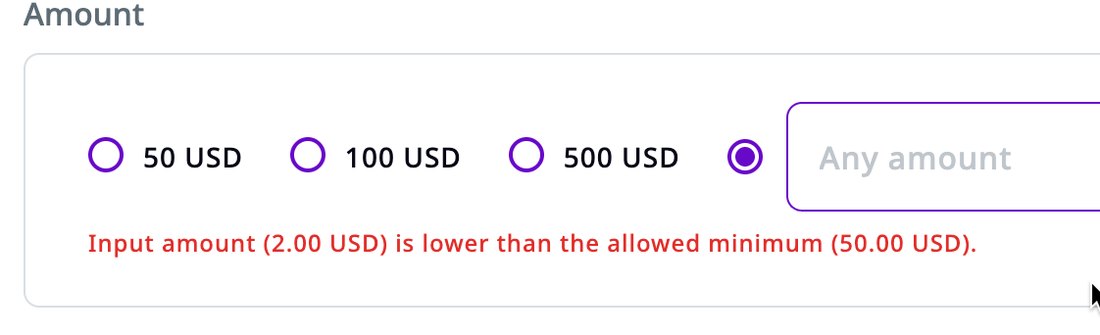
  • Minimum deposit is 50 USD, but the field says "Any amount", and the minimum-amount error stays after the field is cleared.
  • Each payment method has its own terms checkbox.
  • The crypto step itself is clean: QR code, temporary address, 10-minute timer, fee and total shown.
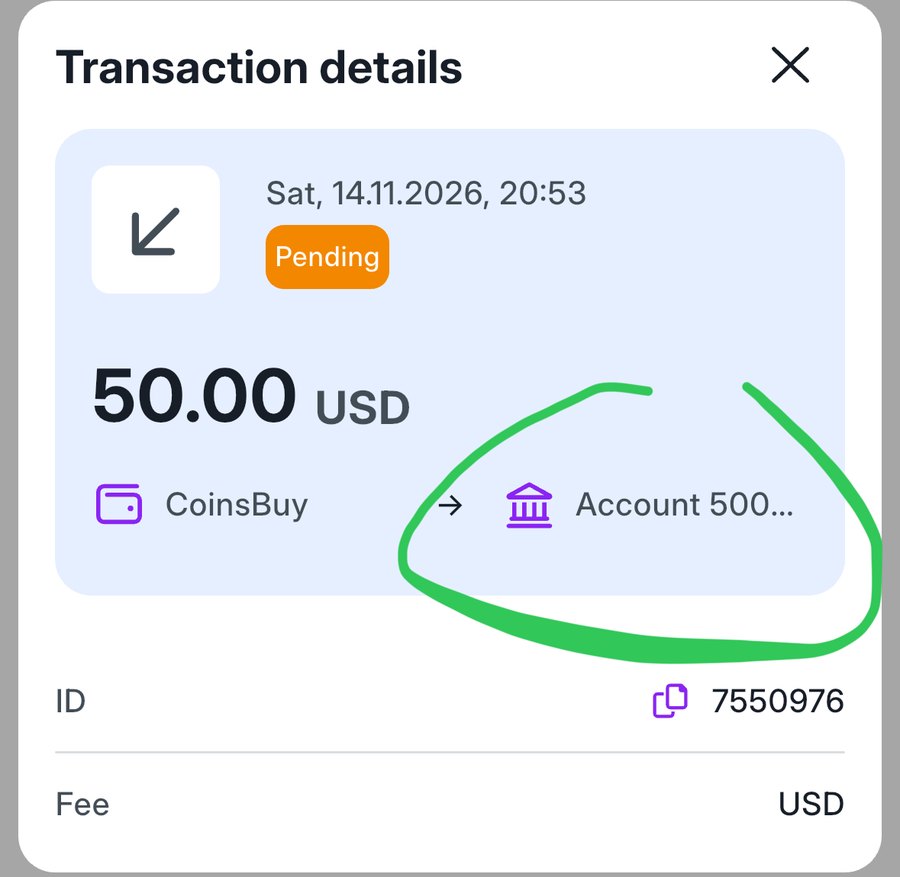
  • Transactions cannot be opened for details, the ID has no copy button, and the destination is cut to "Account 500...".
Deposit amount with presets 50, 100, 500 USD and an Any amount field, error about the 50 USD minimum
"Any amount" until the client types one.

Withdrawal and security

  • The 2FA requirement is shown early, on the deposit and withdrawal pages. Good.
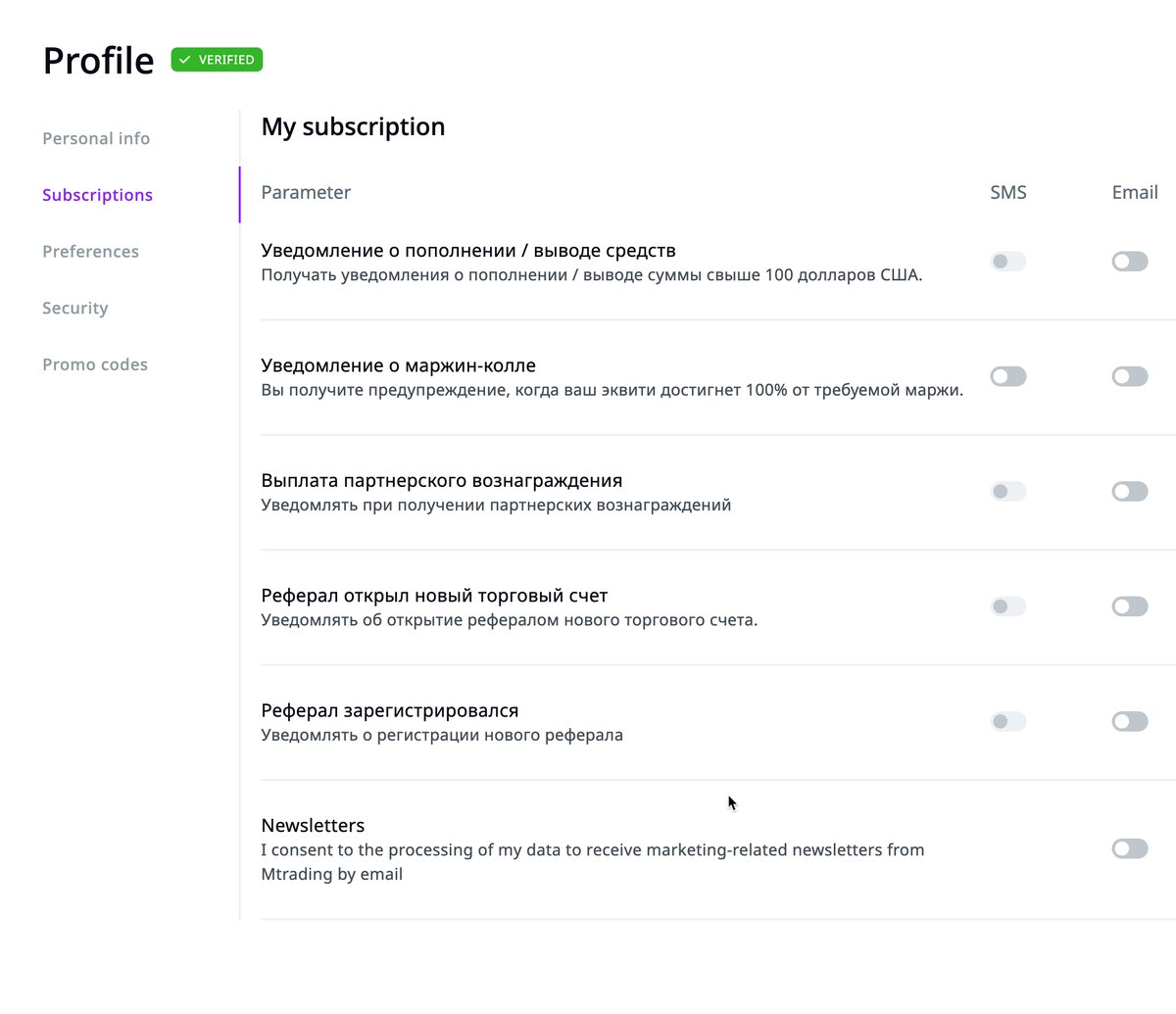
  • 2FA needs a verified phone; the SMS never arrived (see issue 3). SMS notification toggles are disabled, probably for the same reason.

Profile, settings, language

  • After KYC the profile says "Your data meets the conditions of the payment system". Plainer: "You're verified: deposits and withdrawals are available".
  • Saving is inconsistent: notification toggles save silently, Preferences needs a Save button, and neither confirms that anything was saved.
  • Switching to Russian translates only part of each screen. The site runs 13 languages, so translation coverage needs tracking.
  • Reporting currencies: GBP, EUR, GHS, KES, TZS, USD. No INR, MYR, IDR, VND, THB or PHP for an Asia-focused broker.
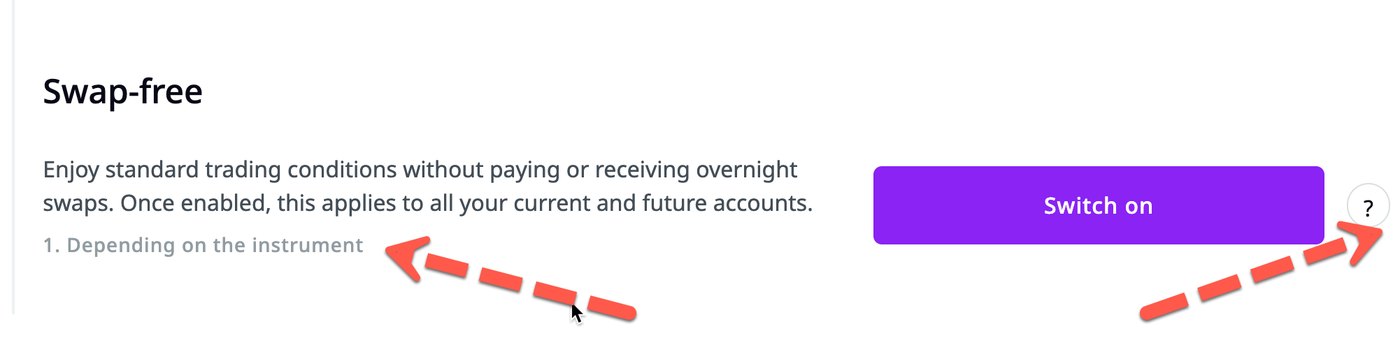
  • Swap-free: unclear text, a footnote that points nowhere, and one click converts all accounts permanently. Show the conditions before the confirm.
  • Marketing newsletter consent is on by default.
Notification settings with Russian selected: section titles in English, items in Russian
Russian selected: titles stay in English.
Swap-free block with an orphan footnote and a question mark
Swap-free: the conditions are not on screen.
Mobile app (iPhone)The client area on a phone: fixes some web wording, adds bugs of its own

Scope

  • Two tabs, Home and Profile: wallet, accounts, deposit, transfer, withdrawal, profile, benefits, live chat. Trading runs in MetaTrader; copy trading, the partner cabinet, quotes and news are not in the app.
  • The App Store listing is in English only, although it says "we speak your language". Its screenshots have typos, overlapping text and another bonus wording, "100% first + 50% floating". Competitor brokers appear under "You might also like".

Better than the web

  • Limits are shown for each payment method: Tether 50 to 100,000 USD, KuCoin Pay 50 to 8,000, Skrill 50 to 5,000.
  • Bonus errors appear under the field, without promotion_id:.
  • Account cards show spread and commission.
  • Sign-up has a partner code field, useful for IB traffic.
  • Live chat answers within minutes.

Broken in the test

  • The SMS code did not arrive, twice; 2FA and withdrawal stay locked. Live chat then sent a code in the chat; it was rejected, and verification locked for 24 hours.
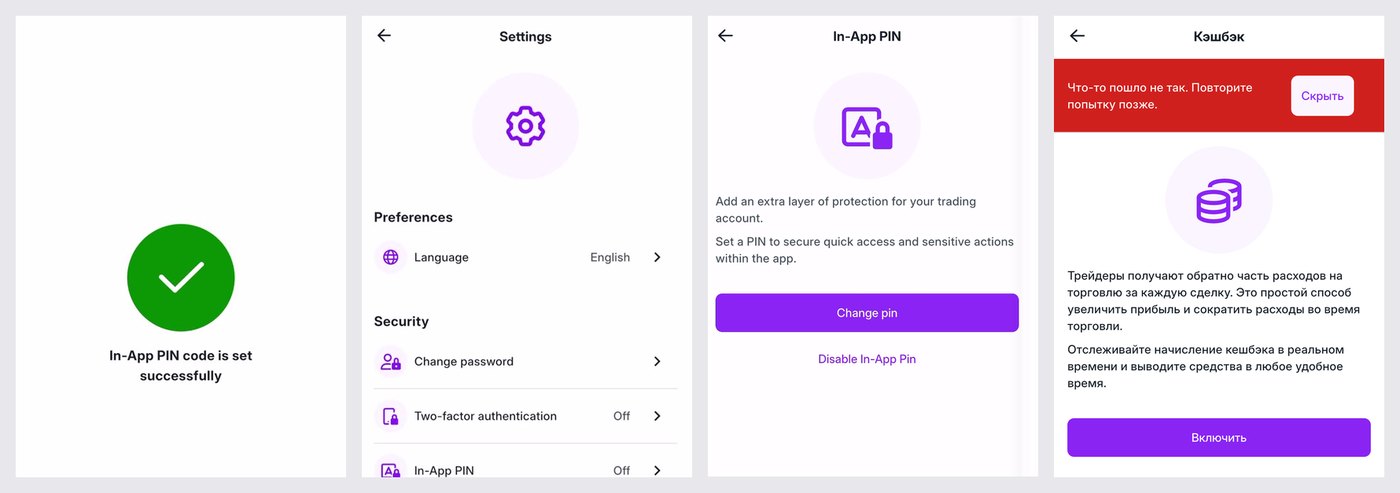
  • Cashback: "Enable" returned "Something went wrong. Try again later", twice. The red banner then follows the user to other screens, with no reason and no link to support.
  • In-App PIN: "In-App PIN code is set successfully", then Settings shows it as Off.
  • Sign-up with a new Gmail address returned a raw permission_denied. Searching an unsupported country shows an empty list with no message.
  • The profile stays at "1/3" complete after the address is filled.
Four app screens: PIN set successfully, Settings showing In-App PIN Off, the PIN page offering Change pin, and the cashback error banner
The PIN is set, yet Settings shows it as Off; cashback cannot be switched on.

Unclear or careless

  • Account tiers: M.Pro charges commission "from 4 pips" (usually quoted in USD per lot). Ultra has the widest spread, from 2 pips, though its name promises the best conditions. Leverage, minimum deposit and bonus eligibility are missing.
  • Account details show no MT5 server and no "Open in MetaTrader" button.
  • A demo account offers Transfer and Withdraw. The transfer field says "From 0.01 to 1,123,234.00", which looks like a test value.
  • Unpaid crypto deposits stay "Pending": the one from 14 November was still open two days later. Times are in UTC without a label.
  • Transaction details cut the destination to "Account 500...". Every account number starts with 500, so the client cannot tell which account. The ID's copy icon gives no sign that anything was copied.
  • Negative Balance Protection is a page of text with no status and no action: it does not say whether it is on or when it starts.
  • "MetaTrader 5" sits next to "Meta Trader 4". In Russian, some blocks stay in English, and one page repeats its title glued to the text.
App transaction details: pending deposit to Account 500 with the number cut off, and an ID with a copy icon
Which account? Every number starts with 500.
05

Products vs competitors

The product line matches the leaders feature for feature, except the app. The gaps are in how each product is packaged, explained and measured.

ProductmTrading todayLeaders in the regionGap to close
Deposit bonus50, 75 or 100% in the client area, from 100, 250 or 500 USD. The site, app and store listings give at least five versions: "50% floating", "up to 200%", "100% + 50%", 0% in one tablePlain deposit bonuses are less visible on the leaders' sites; they push status tiers, prize draws and challenges (Octa), traders clubs and no-deposit offers (XM)One bonus message everywhere; tiers and an upsell inside the deposit form
IB programmeRevenue share 20% to 60% by active clients, 5 levels, 10% from sub-IBs, daily payouts. A 2026 press release says "up to $20 per lot". "Active client" is not defined publiclyPer-lot ladders: XM and FBS up to $80 per lot; Octa $1 to $12 by active clients with a strict "active" rule. HFM pays sub-IB overrides across 5 levels. Exness pays instantly or daily and rewards top partners with cars and travelDefine "active client", publish a per-lot equivalent, self-serve campaigns, a loyalty track for IBs
Copy trading7-day metrics only, 1 to 19 subscribers per strategy, odd figures (13,000% ROI; 0% ROI with profit). Good risk settings. Not in the appXM puts copy trading in its main app with 4,000+ strategies; Octa pays IBs 50% on copy tradesLonger track record, credible ranking, one minimum, copy trading in the app
LoyaltyMPoints per lot, catalogue from a 30-point mug to a 4,600-point iPhone, trading perks, Trade & Travel challenge. Cashback could not be enabled in the appOcta status tiers with prize draws; XM Traders Club; Exness partner loyaltyComparable. Add levels and a track for IBs
Mobile appClient area only: KYC, deposits, bonuses, points; no trading or copy trading. Android 100K+ installs, 4.5 stars; iOS since August 2026, 4 ratings. No store badges on the siteExness Trade 4.7 stars from about 249K reviews, 10M+ installs; XM App 4.5 stars from about 139K, 10M+, copy trading insideAn all-in-one app is the norm
PaymentsLocal methods listed for Malaysia, Indonesia, the Philippines, Bangladesh, Vietnam and Thailand; India UPI only via a payment agent. The payments page has no withdrawal methods, times or limitsLocal instant methods are standard (UPI, FPX and DuitNow, QRIS, PromptPay, MoMo); instant withdrawals are advertisedPublish withdrawal methods, timings and limits

Most competitor IB figures come from a July 2026 comparison by Track360, a partner-software vendor; they need checking on each partner portal. App figures from the store pages as of November 2026.

Partner cabinet

  • Strong: every client is a partner from day one, with a referral link, QR code, 9 report types with PDF and CSV export, sub-partner reports and a rebate tool.
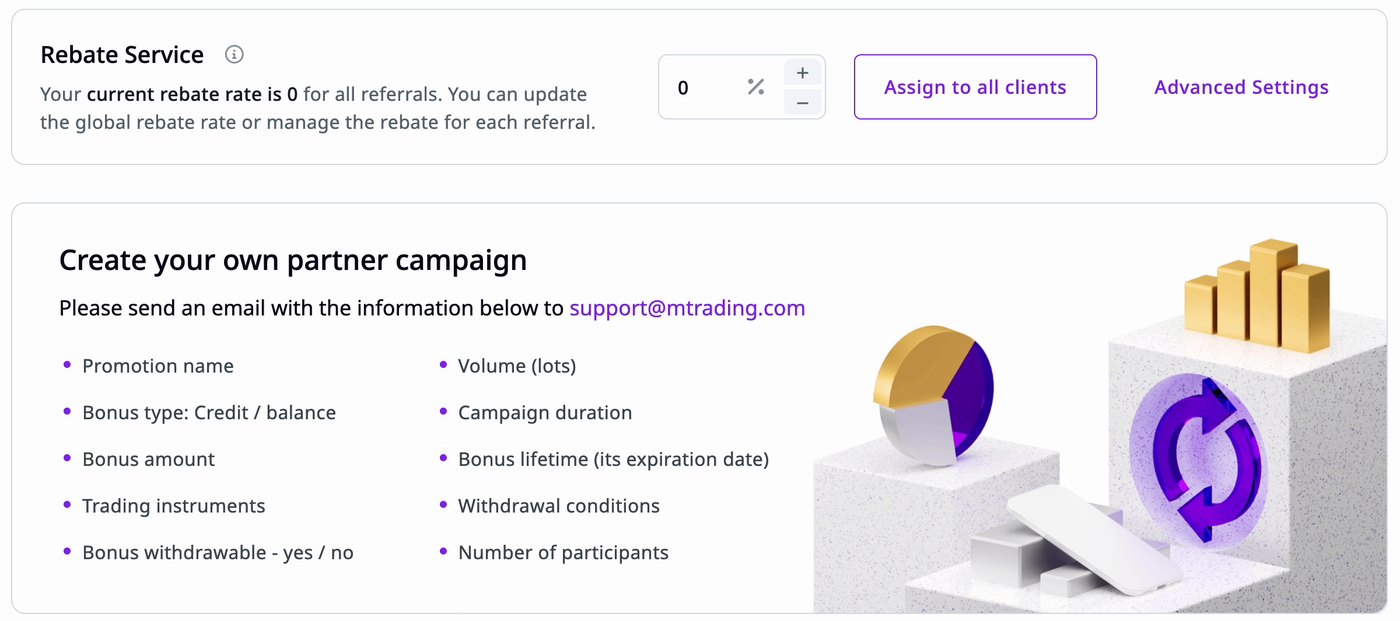
  • "Create your own partner campaign" means emailing support with 10 parameters. The clearest product gap: a self-serve campaign builder for IBs.
  • The rebate setting does not say what the percentage is taken from; setting it to 100% raised no warning.
  • No marketing materials, landing pages, tracking per channel or partner onboarding in the cabinet.

Copy trading screen

  • The subscribe form says "Fund your account with a minimum of 15 USD", "Minimum investment 10 USD" and "The maximum amount 0 usd" at once. The last one means "your balance is 0".
  • Advanced settings are solid: allocation by balance, master volume or fixed lot, ratio, a worked example, daily profit and loss limits.
  • Only 7-day statistics; risk bars look the same for every strategy.
Partner cabinet: Rebate Service and Create your own partner campaign by email to support
Partner campaigns today: an email to support with 10 parameters.
06

Full backlog

Every issue from both tests, in the order a client meets them. Priority is a first estimate.

All issues · 559 high, 24 medium, 22 low · 41 on the web, 14 in the app
55 shown
#AreaIssueFixPriority
1Access WebRaw "504 Gateway Timeout" for blocked regions (Estonian mobile data; once from Belgium)Branded "not available in your region" page with a contact for existing clientsHigh
2Access WebSite blocked from Russian IPs, but Russian phone codes accepted at sign-upOne country list for the block, the form and KYCMedium
3Sign-up WebPassword must mix 4 character typesLength rule only; allow password managersLow
4Sign-up WebPhone code not pre-filled by IP (Hong Kong from Turkey, Afghanistan from Japan and Belgium)Pre-select the code by IPMedium
5Sign-up WebUnsupported phone code accepted until submit, then "Region unavailable for registration"Validate on entry; say upfront who can registerMedium
6Sign-up Web"unknown error" on the submit after a rejected oneReset the bot check after a failed submit; plain error textMedium
7Sign-up WebMarketing emails bundled into sign-up; unsubscribe only via supportSeparate opt-in; unsubscribe linkLow
8Sign-up WebEmail code: no auto-submit; resend after 4 to 5 minutesAuto-submit; resend after 30 to 60 secondsLow
9Sign-up WebPhone number never verifiedVerify at sign-up or first depositHigh
10First login WebApp pop-up with a broken image; 3 app prompts in 2 minutesFix the image; one promptMedium
11First login WebNo welcome emailWelcome email with next steps and the bonusMedium
12KYC WebFirst Sumsub screen reads like a residence questionRephrase or explainLow
13KYC WebResidence never asked; profile shows the passport countryAsk residence; base eligibility on itMedium
14Accounts WebCards lack spread, commission, leverage, minimum and bonus eligibilityShow the website's numbers on each cardMedium
15Accounts Web"Ultra" in the client area vs "M.Ultra" on the siteOne nameLow
16Accounts WebSecond password with its own rules, 15-character maximumGenerate it, show once, email itMedium
17Trading WebWebTrader asks for login and password againPre-fill the login or sign in directlyLow
18Deposit WebMinimum 50 USD hidden behind "Any amount"; site says accounts from $10Show the minimum in the field; align the siteHigh
19Deposit WebMinimum-amount error stays after the field is clearedClear errors on changeLow
20Deposit WebKYC requirement shown only after an amount is chosenState it on the Deposit page and in the bannerHigh
21Transactions WebRows cannot be opened; no copy button for the ID; destination cut to "Account 500..."Details view, one-click copy, full account number and typeLow
22Bonus WebThresholds revealed only by an error; "You will receive" promises a bonus that is refusedTiers on the buttons plus an "add X to get Y" nudgeHigh
23Bonus WebRaw "promotion_id:" in error messagesPlain error textHigh
24Bonus WebDestination defaults to the Wallet; bonus needs a trading accountDefault to an eligible accountMedium
25Bonus WebBonus percentage differs across 5+ places on the site and in the app storesOne bonus message everywhereMedium
262FA Web2FA needs a verified phone; SMS not delivered; 3 attempts then nothingAuthenticator app, email or WhatsApp codes; support pathHigh
27Payments page WebNo withdrawal methods, times or limitsPublish themMedium
28Profile Web"Your data meets the conditions of the payment system""You're verified: deposits and withdrawals are available"Low
29Settings WebSilent autosave in one place, Save button in another; no confirmationOne pattern plus a "Saved" messageLow
30Language WebRussian translates only part of each screenTrack translation coverage per languageMedium
31Currency WebNo Asian reporting currenciesAdd INR, MYR, IDR, VND, THB, PHPLow
32Swap-free WebUnclear text, orphan footnote, "?" opens a generic page, irreversible one-click conversionShow conditions before confirmingMedium
33Notifications WebNewsletter consent on by defaultOff by defaultLow
34Performance WebSome pages load blank or without fields; long loading placeholdersInvestigate front-end loadingLow
35Partner WebOwn campaigns only by emailing support with 10 parametersSelf-serve campaign builderHigh
36Partner WebRebate percentage unexplained; no warning at 100%Explain the base and confirm large valuesMedium
37Partner WebQR pop-up button says only "Download""Download QR code"Low
38Copy trading Web"Minimum 15 USD", "Minimum investment 10 USD" and "The maximum amount 0 usd" on one formOne minimum; "Your balance is 0 USD"Medium
39Copy trading Web7-day stats only; implausible figures (13,000% ROI, 0% ROI with profit)30 and 90-day stats with sanity checksMedium
40Website WebImages served at 1x only, blurry on high-resolution screens2x images via srcsetLow
41Website WebCopy errors, e.g. logout prompt "Are you sure you want to exist?"Proofreading passLow
42Store listing AppEnglish only, typos and overlapping text in screenshots; Russian UI partly in English, one title glued into the textProofread and localise the listing; translation check per languageLow
43Sign-up AppNew Gmail sign-up returns a raw "permission_denied"; unsupported country search shows an empty listPlain messages; say which countries are supportedMedium
44Deposit AppUnpaid crypto deposits stay "Pending" for daysExpire unpaid invoices; show "awaiting payment"Medium
45Transactions AppTimes in UTC without a labelLocal time or a time zone labelLow
46Transactions AppDestination cut to "Account 500..."; ID copy icon gives no feedback; Fee shows "USD" with no numberFull account number and type; "Copied" confirmation; show the feeLow
47Accounts AppCommission "from 4 pips"; Ultra has the widest spread; no leverage, minimum or bonus eligibilityCommission in USD per lot; full conditions on each cardMedium
48Accounts AppAccount details: no MT5 server, no "Open in MetaTrader"Server, login and a link that opens MT5Medium
49Accounts AppDemo account offers Transfer and Withdraw; placeholder "From 0.01 to 1,123,234.00"Hide money actions on demo; real limitsLow
502FA AppSMS code not delivered, twice; 2FA and withdrawal stay lockedSame as web: authenticator app, email or WhatsApp codesHigh
51Support AppLive chat sends a phone code in the chat; after failed attempts verification locks for 24 hoursA written manual procedure with identity checks; other code channelsMedium
52Security AppIn-App PIN "set successfully", Settings shows OffShow the real state after settingMedium
53Profile AppProfile stays "1/3" after the address is filledRecalculate progress on saveLow
54Benefits AppNegative Balance Protection: text only, no status or actionSay when it applies; add a Deposit buttonLow
55Benefits AppCashback "Enable" fails with "Something went wrong"; the banner follows to other screensFix it or hide the benefit until it worksMedium